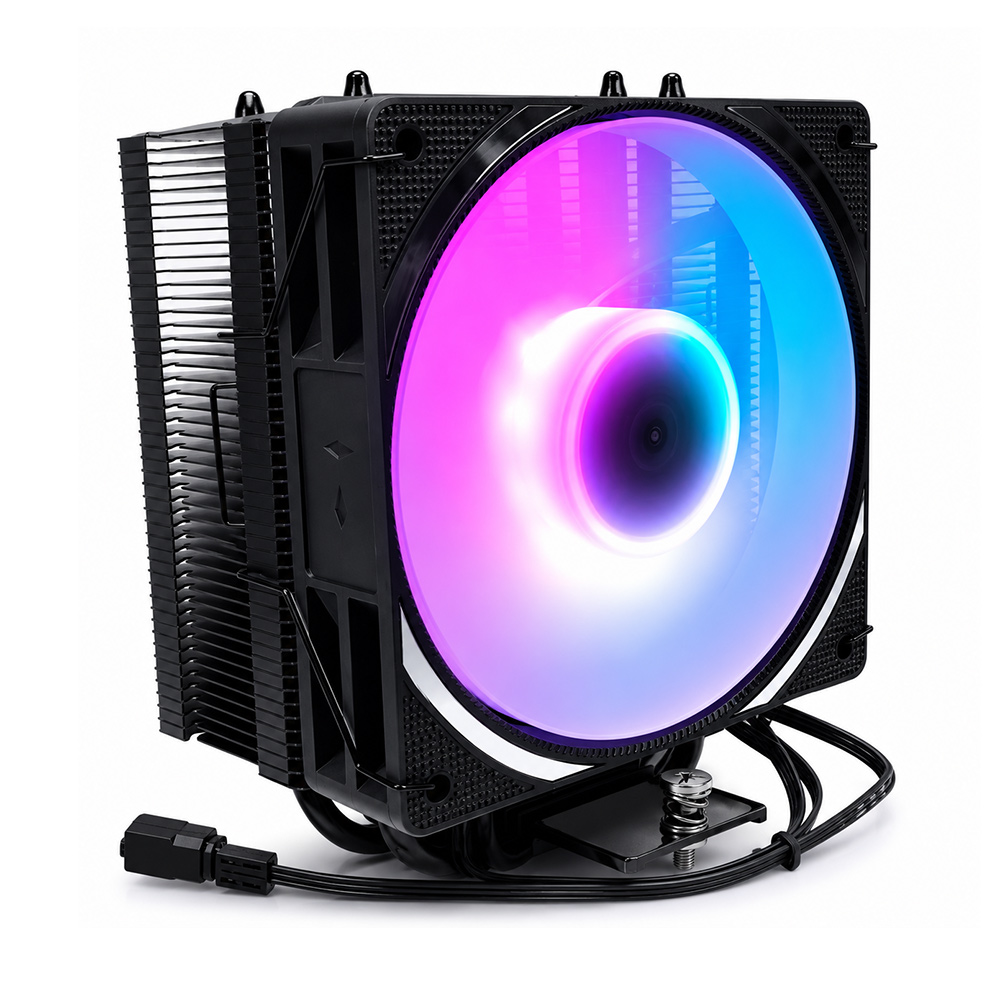

# Enhance Your Build: Integrating the ATX Cooler 104-0050-2 into Your PC Setup
In the ever-evolving world of PC building and customization, cooling solutions play a pivotal role in ensuring optimal performance, system stability, and longevity. Among the myriad of cooling components available, the **ATX Cooler 104-0050-2** stands out as a reliable, efficient, and versatile option for enthusiasts and professionals alike. This article explores how integrating the ATX Cooler 104-0050-2 into your PC setup can elevate your build, providing both functional benefits and aesthetic enhancements.
---
## Understanding the Importance of Cooling in PC Builds
Before diving into the specifics of the ATX Cooler 104-0050-2, it’s essential to understand why cooling is a non-negotiable aspect of any PC setup.
Modern CPUs and GPUs generate significant amounts of heat during operation—especially when running resource-intensive applications like gaming, video editing, or 3D rendering. Excessive heat can throttle performance, cause system instability, and potentially damage hardware components over time.
Effective cooling solutions maintain optimal operating temperatures, enabling components to run at peak efficiency while extending their lifespan. While stock coolers may suffice for basic setups, custom or high-performance builds greatly benefit from advanced cooling options such as the ATX Cooler 104-0050-2.
---
## Introducing the ATX Cooler 104-0050-2
The ATX Cooler 104-0050-2 is an aftermarket cooling fan designed to fit standard ATX cases seamlessly. Its design philosophy centers around maximizing airflow while minimizing noise, a combination highly sought after by PC builders.
Key features include:
- **High Airflow Efficiency:** The fan blades are engineered to push a substantial volume of air, ensuring rapid heat dissipation.
- **Low Noise Operation:** Utilizing fluid dynamic bearings and optimized blade design, it maintains quiet performance even at higher RPMs.
- **Durability:** Built with quality materials to resist wear and tear for extended operational life.
- **Compatibility:** Designed to align perfectly with most ATX form factor cases, enabling easy integration without modification.
These attributes make the ATX Cooler 104-0050-2 an excellent upgrade for anyone looking to enhance cooling performance without compromising on noise or aesthetics.
---
## Integration Benefits: Why Choose the ATX Cooler 104-0050-2?
### 1. Enhanced Thermal Performance
One of the most immediate benefits of adding the ATX Cooler 104-0050-2 is the marked improvement in thermal management. By increasing airflow within the case, hot spots around sensitive components such as the CPU VRMs, GPU, and chipset are significantly reduced. This translates to:
- Lower CPU and GPU temperatures.
- Reduced risk of thermal throttling under load.
- Improved overall system stability during prolonged sessions.
### 2. Quiet Operation for a Better User Experience
A common complaint among PC users is the distracting noise generated by cooling fans. The 104-0050-2 addresses this through its precision-engineered fan blades and fluid dynamic bearing system, which work together to minimize vibration and noise. This makes your PC environment more comfortable whether you are working, gaming, or streaming content.
### 3. Aesthetic Appeal with Customization Potential
Beyond functionality, modern PC builders value the visual appeal of their setups. The ATX Cooler 104-0050-2's design allows for seamless integration with RGB lighting systems or custom shrouds. Its sleek profile complements various case designs, enhancing the overall aesthetic without clutter.
---
## Technical Considerations When Installing the ATX Cooler 104-0050-2
### Align-Items Center Approach for Optimal Placement
When positioning fans inside your PC case, consider the airflow direction and placement to optimize cooling. The ATX Cooler 104-0050-2 should be installed to facilitate a smooth airflow path, typically drawing cool air from the front or bottom and exhausting hot air through the rear or top.
Using a **CSS-like "align-items center"** mindset—metaphorically speaking—can be applied in physical placement to ensure that the fan aligns centrally within the mounting bracket or vent area. This central alignment maximizes airflow coverage across critical components, much like how `align-items: center` in CSS centers elements for balanced layouts.
### Line-Height 1.1: Maintaining Airflow Spacing
In web design, `line-height: 1.1` is used to control vertical spacing for readability. Similarly, in hardware terms, maintaining adequate spacing between cooling components is crucial. Overcrowding fans or obstructing airflow paths can diminish cooling effectiveness.
Ensure that the ATX Cooler 104-0050-2 has enough clearance around it to operate freely. This spacing prevents turbulence and promotes smooth, laminar airflow, optimizing heat dissipation.
### Font-Weight 700: Emphasizing Critical Components
Just as `font-weight: 700` in CSS emphasizes important text, giving priority to critical cooling areas in your build is essential. Focus on installing the ATX Cooler 104-0050-2 near heat-generating components, such as the CPU socket or GPU region, where cooling demands are highest. Prioritizing these zones ensures that your cooling solution delivers maximum impact.
### Employing a Linear-Gradient Background for Visual Flair
While the ATX Cooler 104-0050-2 itself does not feature built-in lighting, modders often pair it with cases or setups that use **linear-gradient background** effects via RGB lighting strips or custom panels.
This gradient lighting can create a visually striking backdrop that complements the fan's silent, efficient operation, enhancing the overall visual appeal of your PC setup. Such aesthetic considerations can transform your build into a centerpiece that reflects your personal style.
### Color #555 and Margin-Top 8px: Subtle Design Cues
When customizing your PC build interface or designing fan mounts and shrouds, subtle color schemes like a neutral **color #555** (a medium gray) provide a professional and understated appearance. It balances well with most case colors and lighting schemes.
Additionally, incorporating a **margin-top of 8px**—in physical terms, a small gap between components—allows for better airflow and easier cable management, contributing to cleaner builds and improved cooling efficiency.
---
## Step-by-Step Guide to Integrate the ATX Cooler 104-0050-2 into Your Setup
### Step 1: Preparation
- Power down your PC and unplug all cables.
- Open your case according to manufacturer instructions.
- Identify existing fan placement and airflow direction.
### Step 2: Remove Existing Fans (If Necessary)
- Unscrew and disconnect current fans that you plan to replace.
- Take note of cable routing and connector types (3-pin or 4-pin PWM).
### Step 3: Install the ATX Cooler 104-0050-2
- Align the fan with the mounting holes, ensuring correct airflow direction (usually indicated by arrows on the fan frame).
- Secure the fan using screws provided.
- Maintain proper clearance to adhere to the "line-height 1.1" concept—avoid tight spaces.
### Step 4: Connect the Fan to the Motherboard or Fan Controller
- Plug the fan connector into the appropriate header on your motherboard or fan controller.
- Use cable ties to manage wiring neatly, maintaining a "margin-top 8px" equivalent space for airflow and aesthetics.
### Step 5: Test and Monitor
- Close the case and reconnect power.
- Boot the system and check BIOS or software fan controls.
- Monitor temperatures to verify improved cooling performance.
---
## Final Thoughts
Integrating the **ATX Cooler 104-0050-2** into your PC setup is a strategic decision that enhances both the thermal performance and aesthetic quality of your build. By focusing on thoughtful installation—employing principles akin to **align-items center**, maintaining adequate spacing like **line-height 1.1**, emphasizing critical cooling zones (**font-weight 700**), and complementing your setup with stylish touches such as **linear-gradient backgrounds** and neutral **color #555** palettes—you elevate your PC from a mere machine to a finely tuned, visually appealing powerhouse.
Whether you’re a seasoned builder or a newcomer eager to optimize your rig, the ATX Cooler 104-0050-2 offers a blend of reliability, efficiency, and style that makes it a worthy addition to any ATX-based system.
---
### Keywords Recap:
- align-items center
- line-height 1.1
- font-weight 700
- linear-gradient background
- color #555
- margin-top 8px
By integrating these conceptual design principles into your physical PC build and fan installation approach, you ensure not only enhanced performance but also a cohesive and professional appearance that sets your setup apart.
---
**Upgrade your build today with the ATX Cooler 104-0050-2 and experience the perfect balance of power, silence, and style!**