

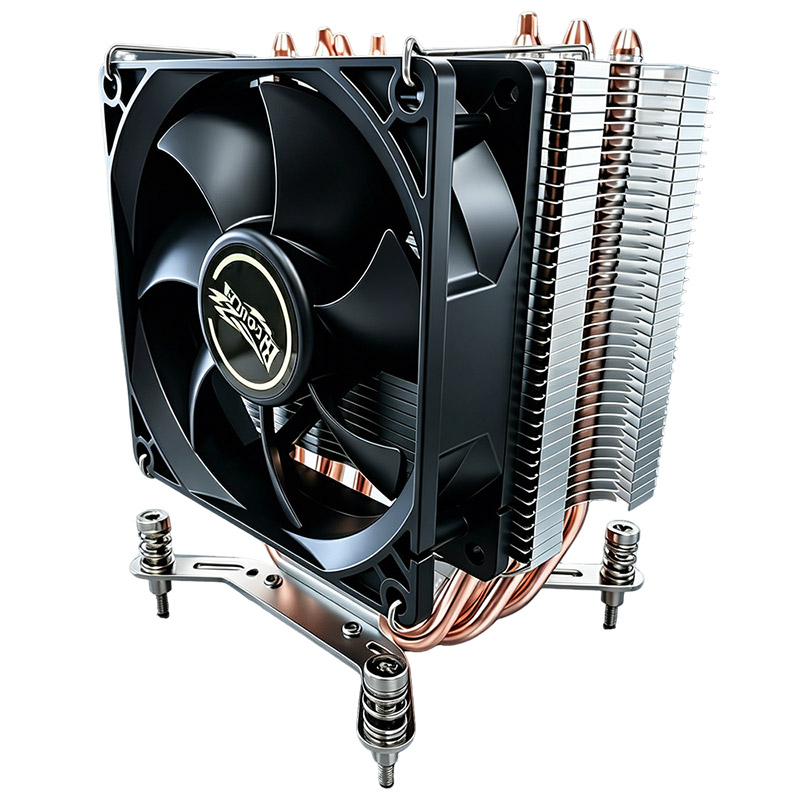
Model 104-0020-1 is a 92 mm ATX CPU air cooler rated to 125 W TDP, built around four direct-contact heat pipes and a 36-fin stack. It occupies the compact end of our desktop range — sized for builds where a 120 mm tower will not clear the side panel or the memory. This guide covers specification, performance behaviour, overclocking headroom, installation, maintenance and buying criteria.
How a Direct-Contact Heat Pipe Cooler Works
Four copper heat pipes run from the base, where they touch the CPU integrated heat spreader directly, up into an aluminium fin stack. The mechanism is a continuous phase cycle:
- Liquid inside the pipe absorbs heat at the base and vaporises.
- The vapour travels to the cooler end of the pipe, driven by the pressure difference.
- It condenses in the fin section, releasing latent heat into the aluminium fins.
- A wick structure returns the liquid to the base by capillary action, and the cycle repeats.
Because the pipes move heat laterally as well as vertically, the whole fin stack contributes — not just the area directly above the die. Direct-contact designs skip the soldered interface between base and pipes, removing one thermal resistance from the path.
Technical Specifications of Model 104-0020-1
| Parameter | Specification |
|---|---|
| Model | ATX Cooler 104-0020-1 |
| Overall Dimension | 75 × 96 × 132 mm |
| Weight | 357 g |
| TDP | 125 W |
| Heat Pipes | 4 (direct contact) |
| Fin Count | 36 fins |
| Base Construction | Heat pipe direct contact |
| Surface Treatment | Degreasing |
| Fan Dimension | 92 × 92 × 25 mm |
| Fan Blades | 7 blades / black |
| Rated Voltage / Current | 12 V DC / 0.38 A |
| Power Consumption | 4.56 W |
| Fan Speed | 3500 RPM ±10% (PWM) |
| Bearing Type | Hydraulic bearing |
| Fan Life | 30,000 hours |
| Static Pressure | 5.58 mmH2O (MAX) |
| Air Flow | 58.11 CFM (MAX) |
| Noise | 42.6 dBA |
| Connector | 2.54-4Pin PWM |
| CPU Compatibility | Universal platform |
| Package | 555 × 375 × 350 mm, 30 pcs, 13.2 kg net |
Two figures capture the character of this cooler. The 58.11 CFM air flow is the highest in our desktop line — this is a volume-oriented design, not a pressure-oriented one. And the 42.6 dBA noise rating at 3500 RPM tells you it is built to move air rather than to be inaudible. That is the right trade for a compact case with restricted intake area, where the fan must overcome resistance rather than simply blow freely.
The hydraulic bearing is a deliberate contrast with our server parts. In a desktop, a hydraulic bearing runs quieter and its 30,000-hour rating is more than adequate for consumer duty cycles. In a 24/7 server it would be the wrong choice — which is why our server heat sinks use two ball bearings instead.
Performance Behaviour: What to Expect
| Scenario | Expected Behaviour | Notes |
|---|---|---|
| Idle / light desktop | Fan near minimum duty, effectively silent | PWM floor of roughly 30% keeps airflow moving without noise |
| Sustained gaming load | Steady state after thermal soak | Expect the fan to ramp; a plateau indicates adequate capacity |
| Full synthetic load (Prime95 class) | Approaches TDP limit | A 125 W part under 125 W of load has little margin — that is by design |
| Short burst workloads | Excellent response | The copper base absorbs bursts before the fan even needs to ramp |
| Sustained overclock beyond rated TDP | Throttling likely | See the overclocking section below |
Is It Suitable for Overclocking?
The honest answer is: for moderate overclocks, yes; for aggressive ones, no. Model 104-0020-1 is rated at 125 W TDP, and overclocking raises power draw beyond stock. Some practical guidance:
- Modest all-core overclocks on a mid-tier CPU are within reach. The four heat pipes and 36-fin stack have some headroom above nameplate TDP.
- Voltage-increase-heavy overclocks are not. Power scales roughly with the square of voltage, so a small voltage bump can add tens of watts.
- Chassis airflow is the deciding factor. A 125 W cooler in a well-ventilated case will outperform the same cooler in a sealed one with a hot intake.
- If you need margin, size up. Our ATX cooler 104-0050-2 is rated to 200 W with a 120 mm fan and is the correct choice for overclocking programmes.
Installation Guide: Step-by-Step
- Power down and unplug. Discharge yourself before touching the board.
- Check clearance first. The 132 mm height and 96 mm width must clear both the side panel and the memory slots. Measure before you start, not after.
- Clean the IHS and base with isopropyl alcohol until both are uniformly bright.
- Apply TIM as a thin central line. Direct-contact heat pipe bases have visible gaps between the pipes — a slightly larger quantity than usual helps fill them, but do not overdo it.
- Mount diagonally. Alternate opposite corners, bringing the fasteners down gradually to avoid tilting the base.
- Connect PWM to CPU_FAN. Confirm tachometer feedback in BIOS.
- Set a sensible fan curve. A floor around 30% duty and a ramp that reaches full speed near 80 °C gives the best noise-to-temperature balance.
- Load test and record. Establish a temperature baseline so future drift is detectable.
Maintenance & Cleaning
- Clean the fin stack every 3–6 months in a typical home environment. Dust is the most common cause of gradual temperature rise.
- Use low-pressure compressed air along the fin channels. Hold the fan blades stationary while doing so.
- Re-check mounting pressure annually. Thermal cycling can relax retention hardware, reducing contact pressure.
- Re-apply TIM every 2–3 years if the system runs hot. Paste dries out and loses thermal conductivity over time.
Common Issues & Troubleshooting
| Symptom | Likely Cause | Corrective Action |
|---|---|---|
| Fan runs at 100% constantly | Fan curve misconfigured or temperature sensor fault | Reset the BIOS fan curve; verify sensor readings |
| Higher-than-expected idle temperature | Poor mounting pressure or excess TIM | Re-seat diagonally; reduce TIM quantity |
| Temperature spikes under load | Insufficient contact on part of the IHS | Re-mount; check for a tilted base resulting from uneven tightening |
| Rattling or grinding noise | Fan bearing wear or a cable touching the blades | Inspect for obstruction first, then replace the fan |
| Gradual rise over months | Dust accumulation | Clean the fin stack along the channels |
| Throttling under sustained load | Load exceeds the 125 W rating | Reduce voltage, or move to a higher-TDP cooler |
Comparison with Other Popular CPU Coolers
| Cooler Type | Typical TDP | Acoustic Profile | Best For |
|---|---|---|---|
| 104-0020-1 (92 mm, 4 heat pipes) | 125 W | 42.6 dBA at 3500 RPM | Compact cases, moderate cooling, cost-sensitive builds |
| 104-0050-2 (120 mm, 4 heat pipes) | 200 W | 31 dBA at 800–1600 RPM | Gaming and workstation builds, quiet operation |
| Stock cooler (aluminium, 92 mm) | 65–95 W | Audible under load | Low-power CPUs with no thermal ambition |
| Entry 240 mm liquid AIO | 200 W+ | Pump noise plus radiator fans | High-TDP CPUs where a pump is acceptable |
Buying Criteria
- Clearance first. Measure side-panel and memory clearance before considering anything else.
- Match TDP with margin. Choose a cooler rated above your CPU's sustained power, not equal to it.
- Decide your noise target. If silence matters more than raw capacity, step up to a 120 mm design — larger fans move the same air at lower RPM.
- Check socket support. This model uses a universal platform mount; confirm it covers your socket generation.
- Consider the airflow path. A cooler is only as good as the air it receives.
OEM / ODM Customization
Model 104-0020-1 is available for OEM and ODM programmes with customization across heat pipe count and arrangement, fin pitch, base dimensions, mounting hardware, fan specification and finish. Our process runs from requirement analysis and engineering design through sample testing to mass production.
Contact our engineering team with your target TDP, acoustic specification and chassis constraints.