

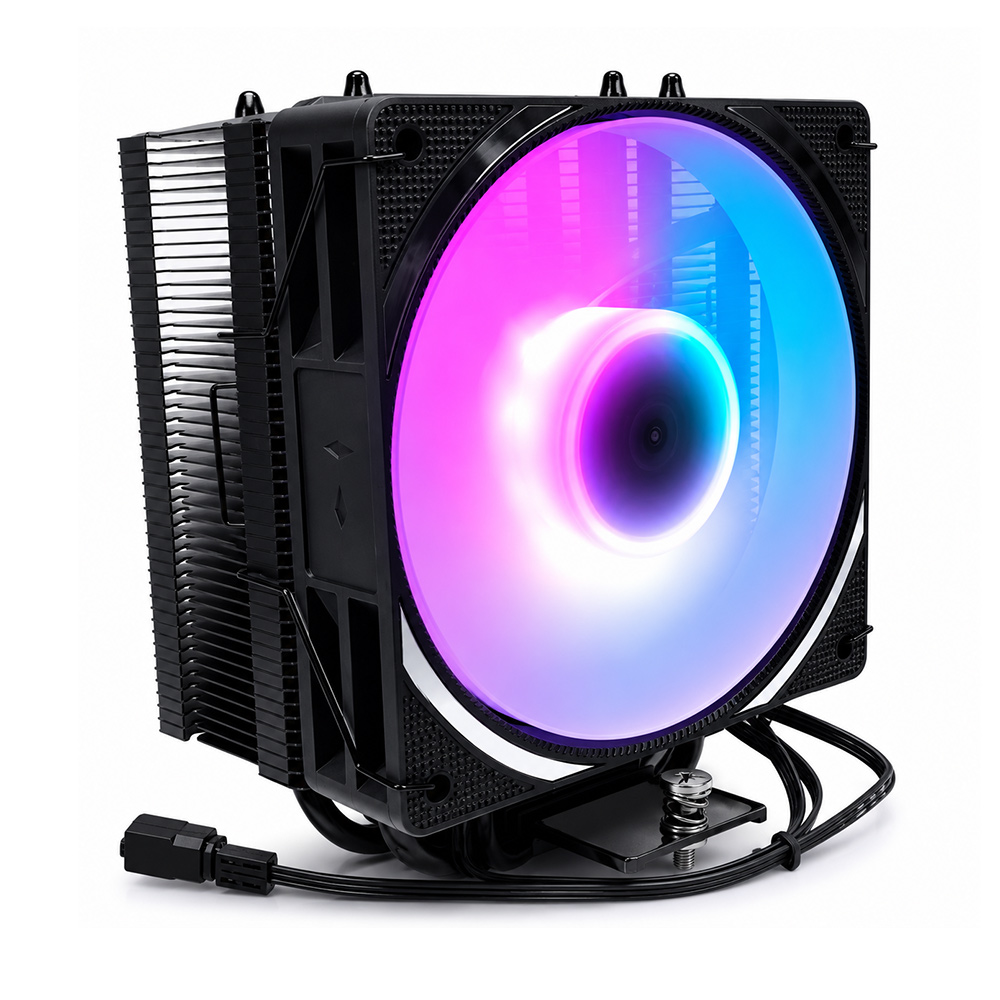
Model 104-0050-2 is our 120 mm ATX tower cooler, rated to 200 W TDP and available in two variants: a LED version and a no-lights version. This guide covers both, because the choice between them is a genuine engineering decision about noise, aesthetics and where the power budget goes — not just a cosmetic preference.
Two Variants, One Thermal Core
Both variants share the same thermal design: a 120 × 75 × 153 mm tower with four heat pipes, a 47-fin stack and a 120 mm PWM fan. The difference is lighting and fan specification:
| Aspect | 104-0050-2 (with lights) | 104-0050-2 (no lights) |
|---|---|---|
| TDP rating | 200 W | 200 W |
| Heat pipes | 4 | 4 |
| Fins | 47 | 47 |
| Fan dimension | 120 × 120 × 25 mm | 120 × 120 × 25 mm |
| Fan speed | 800–1600 RPM ±10% | 800–1600 RPM ±10% |
| Noise | 31 dBA | 31 dBA |
| Air flow | 44.35 CFM (MAX) | 44.35 CFM (MAX) |
| Static pressure | 1.42 mmH2O (MAX) | 1.42 mmH2O (MAX) |
| LED | Yes (RGB lighting) | None |
| Overall dimension | 120 × 75 × 153 mm | 120 × 75 × 153 mm |
The thermal performance is identical. That is worth stating plainly, because marketing language often implies otherwise: LEDs do not make a cooler run hotter in any measurable way at this power level. The LED driver consumes a fraction of a watt against a 200 W thermal load. Where the variants genuinely differ is in user experience — cable management, visual preference, and whether you want light spill inside the chassis.
Technical Specifications of Model 104-0050-2
| Parameter | Specification |
|---|---|
| Model | ATX cooler 104-0050-2 |
| Overall Dimension | 120 × 75 × 153 mm |
| Weight | 585 g |
| TDP | 200 W |
| Heat Pipes | 4 |
| Fin Count | 47 fins |
| Base Material | Heat pipe direct contact |
| Surface Treatment | Baking paint / spray oil |
| Fan Dimension | 120 × 120 × 25 mm |
| Fan Blades | 9 blades / black |
| Rated Voltage / Current | 12 V DC / 0.15 A |
| Power Consumption | 1.8 W |
| Fan Speed | 800–1600 RPM ±10% (PWM) |
| Bearing Type | Hydraulic bearing |
| Fan Life | 30,000 hours (30 °C, 15–65% RH) |
| Static Pressure | 1.42 mmH2O (MAX) |
| Air Flow | 44.35 CFM (MAX) |
| Noise | 31 dBA |
| Connector | 2.54-4Pin PWM |
| CPU Compatibility | Universal platform |
| Package | 470 × 380 × 410 mm, 18 pcs, 11.7 kg net |
Read the fan numbers carefully, because they explain why this cooler is quiet. The fan runs between 800 and 1600 RPM — compare that with 3500 RPM on our 92 mm model. At 31 dBA the acoustic result is dramatically better, and the reason is simple geometry: a 120 mm fan sweeps far more area per revolution, so it can move 44.35 CFM at less than half the rotational speed.
Note also the low static pressure (1.42 mmH2O). This is a free-flowing design that expects an unobstructed intake. In a case with a restrictive front panel or a dust filter that has not been cleaned, it will lose proportionally more performance than a high-pressure fan would. That is the trade for near-silent operation.
Aesthetics vs Performance: The LED Question
There is a real engineering discussion here, even if it is smaller than marketing suggests:
- Power draw. LED lighting adds a small load on the 12 V rail. At 1.8 W total fan consumption, the lighting contribution is negligible against a 200 W thermal budget.
- Cable management. The lighting variant needs an additional connector, and extra cables in a compact build obstruct airflow. On a small form factor case this genuinely matters more than the LEDs themselves.
- Light spill and distraction. For office and studio builds, a dark chassis is often preferred. For a display build, lighting is part of the design.
- Fan blade rigidity. Heavier illuminated blades can have slightly different mass balance, but at these speeds the effect is not significant.
The no-lights version is the correct default for workstations, office PCs and minimalist builds. The LED version suits gaming rigs where the case has a glass panel and lighting is part of the intended look.
Thermal Performance Test: How It Compares
| Cooler Class | TDP | Fan | Noise | Notes |
|---|---|---|---|---|
| 104-0050-2 (120 mm, 4 heat pipes) | 200 W | 120 mm, 800–1600 RPM | 31 dBA | Best noise-to-capacity balance in our desktop range |
| 104-0020-1 (92 mm, 4 heat pipes) | 125 W | 92 mm, 3500 RPM | 42.6 dBA | Compact fit, higher noise, lower ceiling |
| Typical 240 mm liquid AIO | 200–250 W | 2 × 120 mm + pump | Pump + fan noise | Similar capacity; adds a pump as a failure point |
| Low-profile top-down cooler | 65–95 W | 92 mm | Moderate | For HTPC and SFF chassis with height limits |
Against a 240 mm liquid cooler, the 104-0050-2 gives comparable dissipation at 200 W without a pump, without coolant, and without a leak risk. Liquid cooling does pull ahead under sustained loads well beyond 200 W, where a tower air cooler eventually saturates — but that is outside this model's rating by design.
LED vs Non-LED: A Practical Comparison
| Consideration | With Lights | No Lights |
|---|---|---|
| Thermal performance | Identical | Identical |
| Noise | 31 dBA | 31 dBA |
| Cable count | Extra lighting connector | Single PWM connector |
| Best for | Glass-panel gaming builds | Workstations, office, SFF builds |
| Maintenance | Lighting can fail independently of the fan | Single failure mode only |
Building a Quiet PC with This Cooler
- Set a PWM floor. Configure the fan curve to start near 800 RPM. At low load there is no thermal reason to spin faster.
- Delay the ramp. Trigger higher duty only above roughly 70 °C. The 47-fin stack and copper pipes absorb short bursts without needing immediate fan response.
- Ensure intake is unobstructed. Because static pressure is only 1.42 mmH2O, a blocked front panel disproportionately hurts this cooler.
- Clean filters quarterly. A clogged filter converts a quiet cooler into a loud one by forcing the fan to ramp.
- Consider the no-lights variant if you value simplicity — one less connector and one less potential failure point.
Installation Guide: Step-by-Step
- Verify clearance. 153 mm height and 75 mm depth must clear the side panel and memory modules.
- Power down, unplug, ground yourself.
- Clean the IHS and base with isopropyl alcohol.
- Apply TIM as a thin line across the centre. Direct-contact pipe bases benefit from a marginally larger application to fill the inter-pipe gaps.
- Mount diagonally. Alternate opposite corners, tightening gradually.
- Connect PWM to CPU_FAN, plus the lighting connector if applicable.
- Configure the fan curve for low-RPM idle operation.
- Load test. Confirm steady-state temperature and record a baseline.
Maintenance & Cleaning
- Clean the fin stack and fan blades every 3–6 months.
- Hold blades stationary when using compressed air.
- Re-apply TIM every 2–3 years, or sooner if temperatures drift upward.
- Check retention fasteners annually for relaxation.
- For the LED variant, inspect the lighting connector during cleaning — a loose connector can cause flickering that users often mistake for a failed fan.
Common Issues & Troubleshooting
| Symptom | Likely Cause | Corrective Action |
|---|---|---|
| Fan audible at idle | Fan curve floor set too high | Lower the PWM floor toward 800 RPM in BIOS |
| Temperature higher than expected | Restricted intake or dust | Clean filters and fins; check front panel airflow |
| Fan not ramping under load | Curve trigger threshold too high | Set the ramp to start around 70 °C |
| LED flickering (lighting variant) | Loose lighting connector | Reseat the lighting cable; check the header voltage |
| Rattling noise | Fan blade obstruction or bearing wear | Inspect for cables, then replace the fan if needed |
| Throttling above 200 W sustained | Load exceeds the rating | Reduce voltage, or move to a larger cooling solution |
Buying Criteria
- Confirm clearance at 153 mm height before anything else.
- Decide the lighting question up front — it changes the connector count and the cable routing plan.
- Match to your noise target. If silence is the priority, this is the model in our range to choose, at 31 dBA.
- Check case airflow. A low-static-pressure fan needs an unobstructed intake to deliver its rated performance.
- Confirm socket support for your platform generation.
OEM / ODM Customization
The 104-0050-2 platform supports OEM and ODM customization across heat pipe configuration, fin pitch, base dimensions, fan specification, lighting options and finish. Our process runs from requirement analysis and engineering design through sample testing to mass production.
Contact our engineering team with your target TDP, noise target and chassis constraints to begin an evaluation.