# ATX Cooler 104-0020-1 vs. Liquid Cooling Solutions: Pros and Cons
In the world of PC building and maintenance, effective cooling solutions are paramount for ensuring optimal performance and longevity of components. Among the many choices available to enthusiasts and professionals alike, the **ATX Cooler 104-0020-1** stands out as a popular air cooling solution, while liquid cooling systems have gained considerable traction due to their superior thermal management capabilities. This article offers a comprehensive comparison of the **ATX Cooler 104-0020-1** against traditional liquid cooling solutions, exploring their respective pros and cons to help you make an informed decision.
---
## Table of Contents
1. Introduction to Cooling Solutions
2. Overview of the ATX Cooler 104-0020-1
3. Overview of Liquid Cooling Solutions
4. Performance Comparison
5. Installation and Maintenance
6. Noise Levels and Aesthetics
7. Cost Analysis
8. Final Thoughts
---
## 1. Introduction to Cooling Solutions
As central processing units (CPUs) and graphics processing units (GPUs) become more powerful, they generate increasing amounts of heat. Without adequate cooling, this heat can throttle performance or even damage hardware components. Cooling solutions generally fall into two categories:
- **Air Cooling**: Typically involves heat sinks coupled with fans to dissipate heat.
- **Liquid Cooling**: Uses a closed-loop system where liquid circulates through tubes and radiators to absorb and expel heat.
Choosing between these solutions depends on various factors including budget, system requirements, space constraints, and personal preference.
---
## 2. Overview of the ATX Cooler 104-0020-1
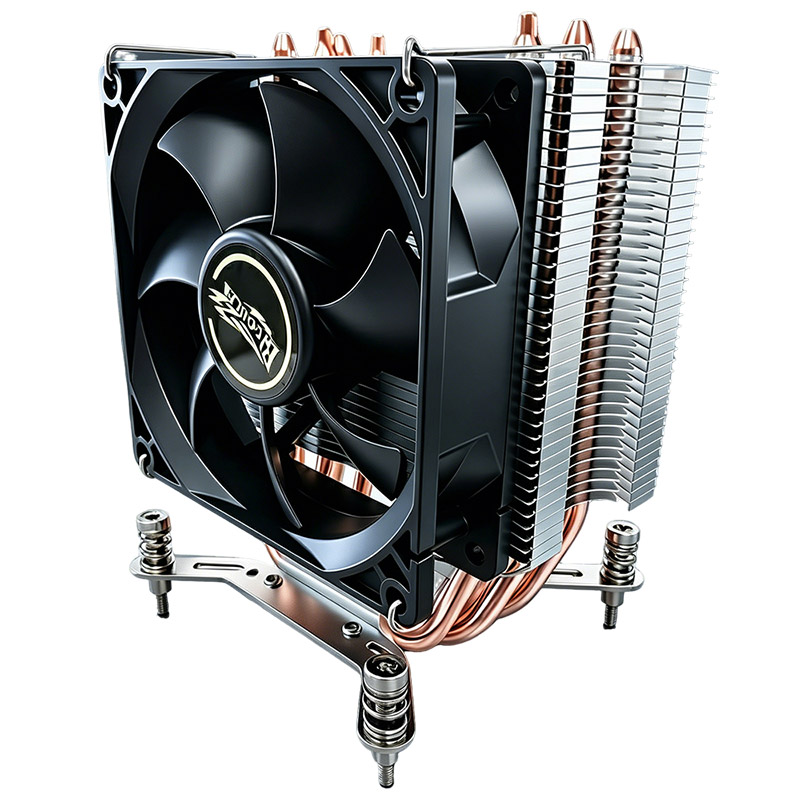
The **ATX Cooler 104-0020-1** is a robust air cooler designed for mainstream and enthusiast PC builds. It features a large heatsink with multiple heat pipes and a high-quality fan that offers efficient heat dissipation.
### Key Specifications:
- **Type**: Air cooler
- **Heat Pipes**: Multiple copper heat pipes for better heat transfer
- **Fan Size**: Typically 120mm, optimized for airflow
- **Compatibility**: Supports a wide range of CPU sockets
- **Build Quality**: Sturdy aluminum fins and copper base plate
### Benefits:
- **Simplicity**: Easy installation with no liquid handling required
- **Reliability**: Fewer moving parts mean less chance of failure
- **Maintenance**: Minimal cleaning, mainly dust removal from fins and fan
- **Cost**: Generally more affordable compared to liquid cooling setups
---
## 3. Overview of Liquid Cooling Solutions
Liquid cooling systems come in various configurations, from all-in-one (AIO) sealed units to custom loops. They circulate coolant through tubes connected to water blocks installed on the CPU (and sometimes GPU), transferring heat to a radiator where fans dissipate it.
### Types of Liquid Cooling:
- **All-In-One (AIO) Coolers**: Pre-assembled, sealed units requiring minimal setup
- **Custom Loops**: Fully customizable systems with separate reservoirs, pumps, and radiators
### Benefits:
- **Superior Cooling Performance**: Liquid absorbs heat more efficiently than air
- **Compact CPU Block**: Allows for better clearance around the CPU socket
- **Aesthetic Appeal**: RGB lighting and sleek tubing add visual flair
- **Lower Noise Levels**: Radiators with larger fans can run at lower speeds
---
## 4. Performance Comparison
### Thermal Efficiency
- **ATX Cooler 104-0020-1**: Efficiently dissipates heat via conduction and forced convection. Ideal for mid-range CPUs and moderate overclocking. However, under extreme loads, air coolers may reach their thermal limits.
- **Liquid Cooling**: Excels in maintaining low CPU temperatures, especially during high-performance tasks or overclocking. The coolant’s higher specific heat capacity allows it to absorb and transport heat away more effectively.
### Temperature Stability
- Liquid cooling tends to offer more stable and consistent temperatures under sustained heavy workloads, making it a preferred option for gaming rigs and workstations running intensive applications.
---
## 5. Installation and Maintenance
### ATX Cooler 104-0020-1
- **Installation**: Straightforward process involving mounting the cooler on the CPU socket with included brackets and applying thermal paste. No risk of leaks or additional components.
- **Maintenance**: Primarily involves cleaning dust from fins and fans periodically to maintain airflow.
### Liquid Cooling Solutions
- **Installation**: More complex, particularly for custom loops. AIO coolers simplify this but still require careful mounting and tubing management.
- **Maintenance**: AIOs are largely maintenance-free until end-of-life. Custom loops need regular coolant replacement, leak checks, and component cleaning.
---
## 6. Noise Levels and Aesthetics
### Noise Levels
- The **ATX Cooler 104-0020-1** uses a fan that can become audible under load but remains generally quiet during typical use.
- Liquid cooling systems typically operate quieter since larger fans on radiators spin at lower RPMs. However, pump noise can sometimes be noticeable.
### Aesthetics
- Air coolers like the ATX 104-0020-1 offer a utilitarian look, though some models include RGB lighting.
- Liquid cooling solutions provide sleek tubing, customizable RGB lighting, and cleaner builds due to compact CPU blocks and radiator placement flexibility.
---
## 7. Cost Analysis
- **ATX Cooler 104-0020-1**: More budget-friendly, making it accessible for most users. Offers excellent value for entry-level to mid-range cooling needs.
- **Liquid Cooling**: Higher upfront cost, especially for custom loops. AIO coolers are moderately priced but still above most air coolers. However, the premium cost comes with improved cooling and aesthetics.
---
## 8. Final Thoughts
Selecting between the **ATX Cooler 104-0020-1** and liquid cooling solutions depends on your specific requirements:
- **Choose ATX Cooler 104-0020-1 if**: You want reliable, easy-to-install cooling on a budget without compromising much on performance for everyday usage or moderate overclocking.
- **Choose Liquid Cooling if**: You seek maximum cooling efficiency, plan to overclock aggressively, desire a quieter system, or prioritize the aesthetics of your build.
---
## Technical Styling Notes for Web Presentation
To ensure an optimal reading experience when publishing this article on your website or blog, consider implementing the following CSS styles:
```css
/* Reset default browser styles */
* {
margin: 0;
padding: 0;
box-sizing: border-box;
}
/* Base font and smoothing */
body {
font-family: 'Segoe UI', Tahoma, Geneva, Verdana, sans-serif;
background-color: #f4f8ff;
color: #111;
-webkit-font-smoothing: antialiased;
text-rendering: optimizeLegibility;
overflow-x: hidden;
}
/* Page wrapper for consistent spacing */
.page-wrapper {
padding: 24px 14px;
}
/* Container to center content and limit width */
.container {
max-width: 1180px;
margin: 0 auto;
}
/* Hero section styling */
.hero {
background-color: #eaf2ff;
border-bottom: 1px solid #ccc;
padding: 40px 20px;
text-align: center;
}
```
Implementing these styles will create a clean, readable layout that aligns with modern web design standards, enhancing the professional tone of your content.
---
### Keywords Recap:
- reset
- margin
- padding
- box-sizing
- font-family
- page wrapper
- background color (#f4f8ff)
- text color (#111)
- overflow-x hidden
- font smoothing (webkit-font-smoothing: antialiased)
- text rendering (optimizeLegibility)
- section padding (24px 14px)
- container max-width (1180px)
- container margin auto
- hero background (#eaf2ff)
- hero border-bottom (1px solid #ccc)
---
By carefully weighing the advantages and limitations of both cooling methods, you can tailor your PC build to meet your unique performance and aesthetic preferences. Whether opting for the dependable ATX Cooler 104-0020-1 or venturing into the realm of liquid cooling, proper thermal management remains a cornerstone of high-performance computing.