
# Optimizing Server Performance with the 2U Heatsink 104-0046-1: Tips and Tricks
In today’s fast-paced digital world, server performance can make or break the efficiency and reliability of your IT infrastructure. Whether managing a data center, cloud services, or enterprise-level applications, maintaining optimal server temperatures is critical to ensuring longevity and peak performance. One essential component in this thermal management ecosystem is the heatsink — specifically, the **2U Heatsink 104-0046-1**. This article explores how to optimize server performance using this high-efficiency heatsink, delving into practical tips and design considerations to maximize cooling while maintaining system integrity.
---
## Understanding the Role of the 2U Heatsink 104-0046-1
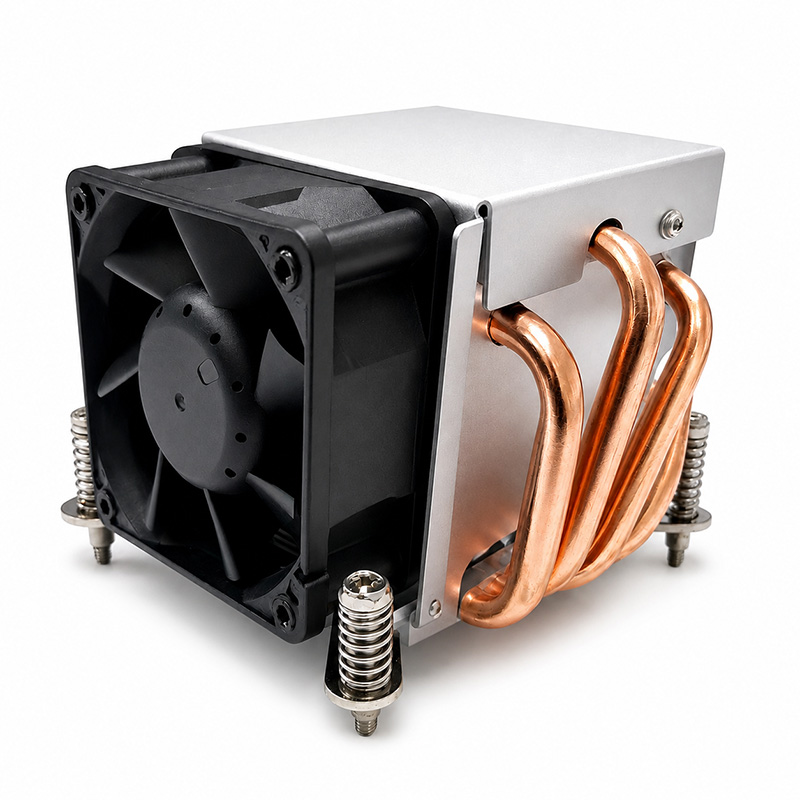
The **2U Heatsink 104-0046-1** is engineered to fit within a 2U form factor server chassis. Designed for high-density computing environments, it provides effective heat dissipation for processors and other heat-generating components. Its compact size combined with superior thermal conductivity materials makes it an ideal choice for systems requiring robust cooling without sacrificing space.
### Why Cooling Matters in Servers
Servers run continuously under heavy loads, generating significant heat. Excessive heat can cause:
- **Component degradation:** Overheating shortens hardware lifespan.
- **Performance throttling:** CPUs and GPUs reduce speed to cool down.
- **System instability:** Heat spikes may lead to crashes or data loss.
Thus, proper cooling solutions like the 2U Heatsink 104-0046-1 play a pivotal role in maintaining system stability and performance.
---
## Key Features of the 2U Heatsink 104-0046-1
Before diving into optimization strategies, it’s important to understand the key features that define this heatsink’s performance:
- **Compact Form Factor:** Specifically designed for 2U servers, balancing space constraints with efficient heat transfer.
- **High Thermal Conductivity:** Made from copper or aluminum alloys that efficiently draw heat away from the CPU.
- **Optimized Fin Design:** Maximizes surface area for better airflow and heat dissipation.
- **Compatibility:** Supports a wide range of CPU sockets and server models.
- **Ease of Installation:** Designed for quick mounting and integration into existing server configurations.
---
## Tips and Tricks to Optimize Server Performance Using the 2U Heatsink 104-0046-1
### 1. Proper Installation and Mounting
The foundation of effective cooling begins with correct installation:
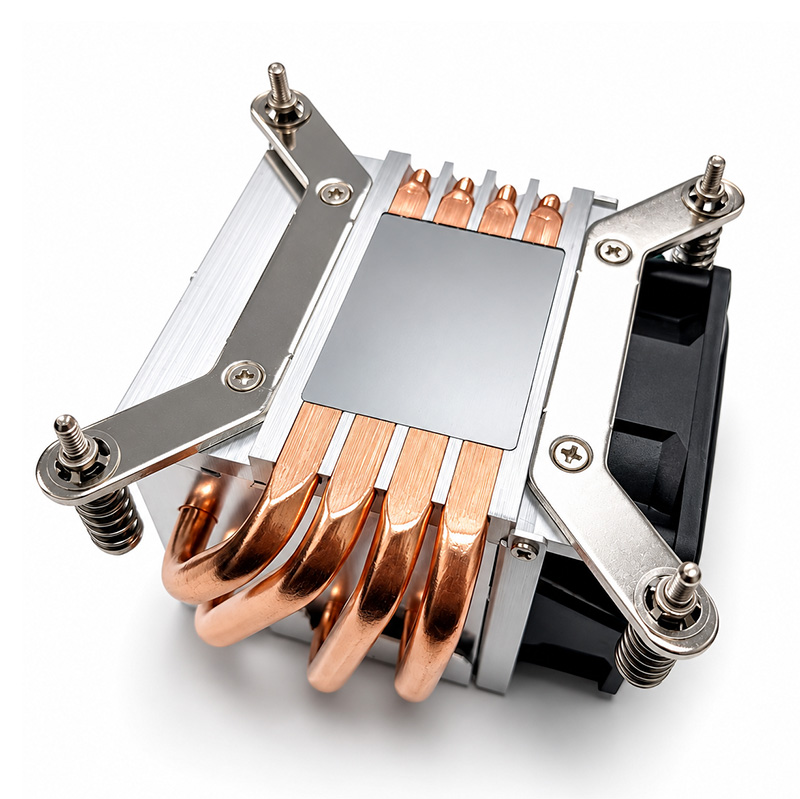
- **Ensure Flat Contact:** The base of the heatsink must sit flush against the CPU surface. Uneven contact reduces thermal conductivity.
- **Use High-Quality Thermal Paste:** Apply an even, thin layer of thermal compound to fill microscopic gaps between the CPU and heatsink base.
- **Secure Mounting:** Fasten mounting screws evenly to avoid pressure points that can warp the heatsink or CPU.
### 2. Consider Airflow Dynamics
Airflow within the server chassis significantly affects cooling efficiency:
- **Maintain Clear Air Paths:** Avoid cable clutter or obstructive components near the heatsink to ensure unobstructed airflow.
- **Leverage Server Fans:** Align the heatsink fins parallel to the direction of airflow generated by server fans.
- **Optimize Fan Speed:** Adjust fan speeds to balance noise levels and cooling needs; sometimes increasing airflow slightly improves temperature control substantially.
### 3. Manage Ambient Temperature and Environment
Server room conditions impact thermal performance:
- **Control Room Temperature:** Keep ambient temperatures within recommended ranges (typically 18-27°C or 64-80°F).
- **Use Proper Ventilation:** Ensure HVAC systems provide adequate air exchange and humidity control.
- **Monitor Hot Aisles and Cold Aisles:** Position servers in configurations that promote efficient cooling cycles.
### 4. Regular Maintenance and Cleaning
Dust and debris accumulation degrade heatsink performance:
- **Schedule Routine Cleaning:** Remove dust buildup from heatsink fins and fans to maintain airflow.
- **Inspect Thermal Paste:** Over time, thermal paste can dry out; reapply as part of periodic maintenance.
- **Check Fan Operation:** Verify that all cooling fans are functional and replace any defective units immediately.
### 5. Leverage Software Monitoring Tools
Utilize monitoring tools to track temperatures and proactively manage server health:
- **Set Threshold Alerts:** Configure alerts for CPU and system temperatures to respond promptly to overheating.
- **Analyze Workloads:** Identify processes that generate excessive heat and optimize or redistribute workloads accordingly.
- **Integrate with Data Center Infrastructure Management (DCIM):** Use DCIM platforms to correlate thermal data with physical infrastructure metrics.
---
## Integrating CSS Principles for Server Room Monitoring Interfaces
While primarily a hardware-centric discussion, it’s worth noting the importance of well-designed user interfaces for monitoring server performance remotely. Applying CSS best practices ensures clarity and usability in dashboard designs:
- **Reset and Normalize Styles:** Use CSS reset techniques to create consistent styling across browsers for server monitoring tools.
- **Manage Margins and Padding:** Utilize appropriate `margin` and `padding` to space UI elements clearly, preventing clutter.
- **Apply Box-Sizing:** Set `box-sizing: border-box;` to simplify element sizing for responsive layouts.
- **Define Font-Family and Text Rendering:** Choose legible fonts with smooth rendering (`-webkit-font-smoothing`, `text-rendering`) for readability.
- **Page Wrapper and Container:** Use a `.page-wrapper` and `.container` class with defined `max-width` and `margin: auto;` to center content effectively.
- **Hero Section Styling:** Implement a `.hero` section with `background-color`, `border-bottom`, and flexbox properties (`display: flex; flex-wrap: wrap; align-items: center; gap: 20px;`) to highlight key information.
- **Responsive Typography:** Set `.hero-title` font sizes and line heights for hierarchy and emphasis.
These UI considerations enhance the experience for system administrators who rely on real-time data to maintain optimal server conditions.
---
## Case Study: Real-World Impact of the 2U Heatsink 104-0046-1
A mid-sized data center recently upgraded several 2U servers with the 104-0046-1 heatsink to address overheating incidents during peak workloads. Post-installation metrics showed:
- **Average CPU temperatures dropped by 12°C**, reducing thermal throttling.
- **System uptime improved by 8%**, attributed to fewer heat-induced crashes.
- **Energy consumption decreased slightly**, as server fans operated at lower speeds due to improved passive cooling.
- **Maintenance intervals extended**, thanks to stable thermal profiles.
This case underscores the tangible benefits of investing in quality heatsinks and optimizing their deployment.
---
## Conclusion
Optimizing server performance is a multifaceted challenge, but thermal management remains a cornerstone of ensuring dependable operation. The **2U Heatsink 104-0046-1** offers an excellent blend of compact design and efficient cooling tailored for 2U server environments. By meticulously installing the heatsink, managing airflow, maintaining environmental controls, scheduling regular maintenance, and leveraging monitoring tools, organizations can unlock the full potential of their hardware.
Additionally, complementing these technical strategies with thoughtfully designed monitoring interfaces—applying CSS best practices for layout and typography—can empower IT teams with clearer insights and faster responses.
Investing time and resources into optimizing your server cooling infrastructure today not only safeguards hardware assets but also drives sustained performance and business continuity tomorrow.
---
If you’re considering upgrades to your server cooling systems or need expert advice on integrating the 2U Heatsink 104-0046-1, don’t hesitate to consult with your hardware vendor or thermal management specialists. Efficient cooling is no longer optional—it’s imperative for modern computing success.