
# Troubleshooting Common Issues with the Server Heatsink 2U 104-0046-1
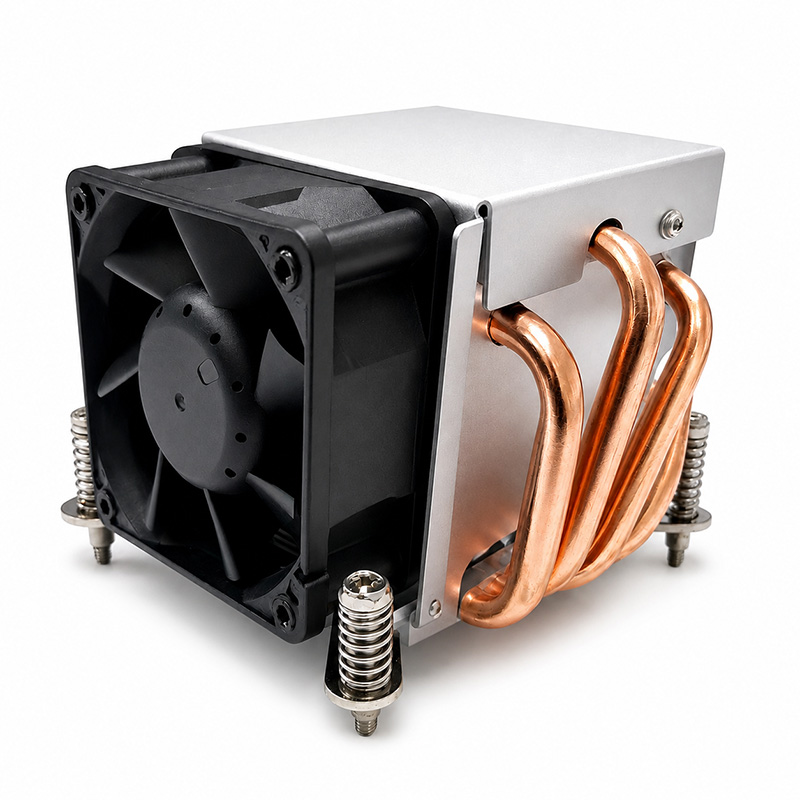
In modern data centers and enterprise environments, maintaining optimal server performance is paramount. One critical component that ensures servers operate within safe thermal limits is the heatsink. The **Server Heatsink 2U 104-0046-1** is a widely used cooling solution designed to dissipate heat generated by high-performance processors housed in 2U rackmount servers. Despite its robust design, users may occasionally encounter issues that affect its efficiency and functionality. This article provides a comprehensive troubleshooting guide to help IT professionals and system administrators identify and resolve common problems associated with the Server Heatsink 2U 104-0046-1.
---
## Understanding the Server Heatsink 2U 104-0046-1
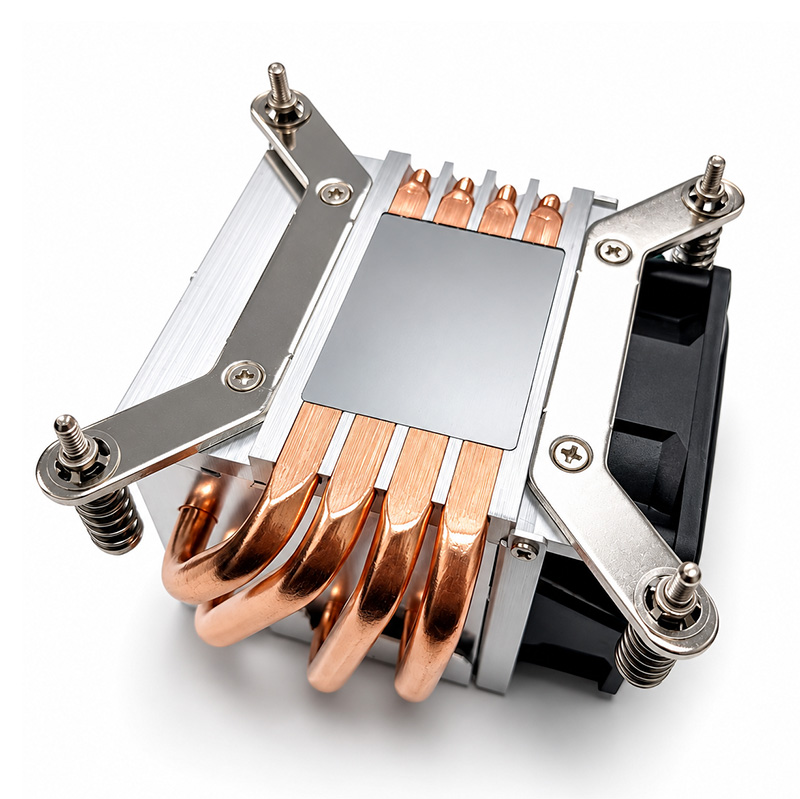
Before delving into troubleshooting, it’s essential to understand the purpose and design of this particular heatsink. The 2U 104-0046-1 is engineered to fit within a 2U chassis, optimizing space while maximizing airflow and heat dissipation. It features an aluminum fin array combined with heat pipes and a fan assembly that enables efficient cooling for high TDP (Thermal Design Power) CPUs.
This heatsink relies heavily on proper airflow management inside the server chassis, which makes factors like **margin**, **padding**, and **overflow-x** considerations not just in mechanical terms but also metaphorically in how components fit and interact.
---
## Common Issues and Troubleshooting Steps
### 1. Overheating Despite Proper Installation
#### Symptoms:
- Server CPU temperature exceeding recommended limits.
- Frequent thermal throttling or unexpected shutdowns.
- Alert notifications from server management software.
#### Possible Causes:
- Dust accumulation clogging the fin array.
- Incorrect seating of the heatsink leading to poor thermal contact.
- Thermal paste degradation or improper application.
- Fan failure or suboptimal fan speed settings.
#### Troubleshooting Steps:
- **Inspect for Dust and Debris:** Use compressed air to clean the heatsink fins. Dust acts as an insulator, drastically reducing heat transfer efficiency.
- **Verify Heatsink Seating:** Remove and reseat the heatsink carefully, ensuring even pressure distribution. Pay attention to any **margin** around mounting brackets to ensure the heatsink is flush with the CPU surface.
- **Reapply Thermal Paste:** Clean the old thermal compound with isopropyl alcohol and apply a new, thin layer of high-quality thermal paste. Over-application can cause excessive **padding**, leading to poor heat conduction.
- **Check Fan Operation:** Confirm that fans attached to the heatsink are spinning at designated speeds. If the server supports fan speed control, verify configurations in the BIOS or management interface.
---
### 2. Physical Fitment Problems Within the Server Chassis
#### Symptoms:
- Difficulty installing the heatsink due to tight space.
- Obstruction with nearby components such as RAM modules or power cables.
- Interference causing noise due to vibration.
#### Possible Causes:
- Incompatibility with certain server chassis models.
- Improper cable management leading to blocked airflow.
- Warping or damage to mounting hardware affecting alignment.
#### Troubleshooting Steps:
- **Check Compatibility:** Verify that the 104-0046-1 is compatible with your server model. Refer to manufacturer documentation for chassis and component clearances.
- **Manage Internal Layout:** Utilize cable ties and routing techniques to reduce clutter. This improves airflow and prevents cables from impinging on the heatsink or fans.
- **Review Mounting Hardware:** Examine screws, clips, and brackets for signs of wear or warping. Replace any damaged parts to maintain correct **margin** and **padding** for secure installation.
---
### 3. Excessive Noise from the Heatsink Fan Assembly
#### Symptoms:
- Loud buzzing, whirring, or rattling sounds from the server.
- Noise level increases with server workload.
#### Possible Causes:
- Fan bearing wear or damage.
- Imbalanced fan blades.
- Vibration due to loose mounting or proximity to other components.
#### Troubleshooting Steps:
- **Clean the Fan:** Dust buildup can cause imbalance and noise. Thoroughly clean fan blades and motor housing.
- **Inspect for Damage:** Check for cracks or deformities in the fan blades that might cause uneven rotation.
- **Secure Mounting:** Ensure that the heatsink and fan assembly are firmly mounted with all screws tightened appropriately to reduce vibration. Adjust **margin** between mounting points if necessary.
- **Replace Fan if Needed:** If noise persists after cleaning and securing, consider replacing the fan with a compatible unit.
---
### 4. Inefficient Cooling Due to Airflow Constraints
#### Symptoms:
- Elevated temperature readings despite functioning fans.
- Hotspots detected on the motherboard near the CPU.
#### Possible Causes:
- Poor server chassis ventilation.
- Blocked intake/exhaust vents.
- Improper orientation of airflow direction in server racks.
#### Troubleshooting Steps:
- **Assess Server Rack Layout:** Ensure that hot and cold aisles are properly configured to facilitate natural airflow. The **background color** of server room walls (metaphorically speaking) might be less relevant than the actual environmental conditions, but good ambient cooling is vital.
- **Clear Ventilation Paths:** Check and remove obstructions from server front and rear panels.
- **Utilize Additional Cooling Solutions:** Consider supplemental fans or liquid cooling options if airflow remains inadequate.
---
### 5. Firmware or BIOS-Related Issues Affecting Heatsink Performance
#### Symptoms:
- Fan speed not adjusting according to CPU temperature.
- Inaccurate temperature reporting.
- Server misreporting thermal events.
#### Possible Causes:
- Outdated BIOS or firmware.
- Misconfigured thermal management settings.
- Faulty sensors or controller chips.
#### Troubleshooting Steps:
- **Update BIOS/Firmware:** Obtain the latest updates from the server or motherboard manufacturer. Updates often include improved thermal management algorithms.
- **Reset Thermal Settings:** In the BIOS, reset fan profiles to default or optimized modes.
- **Check Sensor Health:** Use diagnostic tools to verify sensor accuracy. Replace hardware if sensors are faulty.
---
## Best Practices for Maintaining Heatsink Efficiency
To minimize the likelihood of encountering issues with the Server Heatsink 2U 104-0046-1, consider these proactive measures:
- **Regular Maintenance Schedule:** Establish routine cleaning intervals, particularly in dusty environments.
- **Environmental Monitoring:** Use data center infrastructure management (DCIM) tools to monitor temperature, humidity, and airflow continuously.
- **Proper Documentation:** Keep detailed records of installation, maintenance, and any modifications to ensure traceability.
- **Training and Awareness:** Educate technical staff on the importance of precise installation involving correct application of **padding**, understanding **margin** tolerances, and ensuring adequate **box-sizing** of components in physical and figurative terms.
---
## Conclusion
The Server Heatsink 2U 104-0046-1 is a critical component in managing CPU temperatures in 2U rackmount servers. While it is generally reliable, issues such as overheating, fitment problems, noise, and inefficient cooling can arise due to various mechanical, environmental, or firmware-related factors. By following systematic troubleshooting steps — from cleaning and reseating the heatsink to updating BIOS settings and optimizing airflow — IT professionals can effectively diagnose and resolve these problems.
Remember, effective thermal management is not just about the heatsink itself but also hinges on the harmonious integration of server hardware, chassis design, and data center environment. Applying concepts akin to **resetting margins**, adjusting **padding**, and optimizing **box-sizing** in a web design analogy, system administrators can ensure that each component fits perfectly and functions optimally within the broader infrastructure.
By adhering to best practices and conducting regular maintenance, organizations can extend the lifespan of their servers, maintain consistent performance, and avoid costly downtime due to thermal failures.
---
*For further technical support or to obtain replacement parts for the Server Heatsink 2U 104-0046-1, consult your hardware provider or authorized service center.*